TRSTD login
1. General information
Prerequisites:
| Requirement | Description |
|---|---|
| tlciid | Your integration ID (e.g. tlci-09b765de-08ed-4b95-bd38-35d6d9ed9c19) |
| Client ID | Issued by Trusted Shops for your integration |
| Client Secret | Issued by Trusted Shops. Used to securely authorize backend requests |
| Backend | PHP (7.4+) or Node.js environment |
| Frontend | Website where the trstd login widget is embedded |
2. Requirements
Content Security Policy (CSP) Configuration
To ensure trstd Login works correctly and securely in your shop or website, your Content Security Policy (CSP) must allow resources loaded from our CDN.
Below you’ll find a simple CSP configuration that:
-
Allows scripts, styles, images, and fonts from the trstd Login CDN
-
Supports web components that inject
<style>tags (by allowingunsafe-inline) -
Keeps a secure default by restricting all other sources
Simple (wildcard) CSP
-
allows our CDN for scripts, styles, images and fonts
-
tolerates components that inject style-tags by allowing
unsafe-inline(web components)
Option 1: Set CSP via HTTP Header (Recommended)
If your platform allows you to configure HTTP headers, use the following CSP:
Content-Security-Policy: default-src 'self';
script-src 'self' https://cdn.trstd-login.trstd.com;
style-src 'self' 'unsafe-inline' https://cdn.trstd-login.trstd.com;
img-src 'self' data: https://cdn.trstd-login.trstd.com;
font-src 'self' data: https://cdn.trstd-login.trstd.com;
connect-src 'self';
frame-ancestors 'self';
base-uri 'self';
Option 2: Set CSP via HTML Tag
If you cannot set HTTP headers, you can embed the CSP directly in your HTML:
<meta http-equiv="Content-Security-Policy"
content="default-src 'self';
script-src 'self' https://cdn.trstd-login.trstd.com;
style-src 'self' 'unsafe-inline' https://cdn.trstd-login.trstd.com;
img-src 'self' data: https://cdn.trstd-login.trstd.com;
font-src 'self' data: https://cdn.trstd-login.trstd.com;
connect-src 'self';
base-uri 'self';
3. How to integrate without plugin
The integration of trstd Login consist of two parts: Frontend part and Backend part.
3.1 Frontend Integration
- Place the following HTML snippet on any page where you want users to verify the authenticity of your website and personalize their experience:
<trstd-login tlciid="tlci-09b765de-08ed-4b95-bd38-35d6d9ed9c19"></trstd-login>
<script type="module" src="https://cdn.trstd-login.trstd.com/trstd-login/script.js"></script>
What it does:
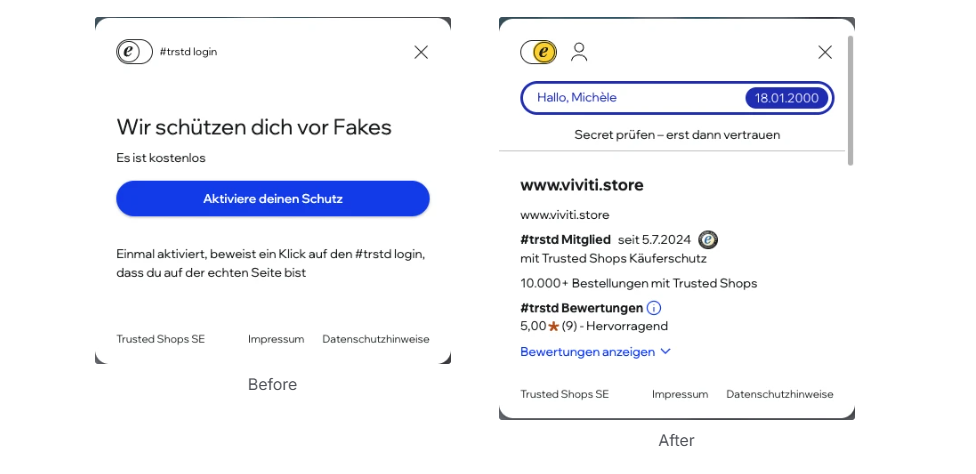
- Displays a trstd login button
What it does technically:
- Starts the OAuth2 login flow when a community of trust member wants to login
- After successful login, it redirects the user to your backend with an authentication code
- It shows a confirmation of your website's authenticity if the setup is correctly done and the website is authentic
Misconfiguration
If the integration is misconfigured the trstd login button will not be shown and the following messages will appear in the JavaScript console:
-
If you website url is not configured for your integration id, it throws the error:
Business profile domain is not allowed! -
Use of wrong tlciid will throw error:
Business profile is not found! -
If you do not pass id:
tlciid must be provided
3.2 Backend Integration
PHP Integration
https://github.com/trustedshops-public/cot-php-integration-library
Installation
Use Composer to install the PHP SDK:
composer require trstd/cot-integration-library
Example Integration
<?php
require_once 'vendor/autoload.php';
use TRSTD\COT\Client;
// Initialize the client
$client = new Client(
<CLIENT_ID>,
// Client ID - e.g. 'cot-switch-X1234567890123456789012345678901'
<CLIENT_SECRET>, // Client Secret - e.g. '1234567890123456789012345678901234567890123456789012345678901234'
<AUTH_STORAGE_INSTANCE>,
// It can be any storage option implementing AuthStorageInterface - e.g. new DatabaseAuthStorage()
<ENV>
// Environment (optional) - dev, qa, or prod, defaults to prod
);
// Invoke handleCallback function to handle code coming from the authentication server
$client->handleCallback();
// Get consumer data for the current user
$consumerData = $client->getConsumerData();
// Access consumer information
if ($consumerData) {
$firstName = $consumerData->getFirstName();
$membershipStatus = $consumerData->getMembershipStatus();
$membershipSince = $consumerData->getMembershipSince();
}
Execute the code above in a page that has access to the frontend environment where it can exchange cookies and query parameters.
AuthStorage Implementations
This example demonstrates how to use PHP to integrate user authentication data storage within your system’s backend.
<?php
namespace TRSTDExampleIntegration\COT;
use TRSTDExampleIntegration\COT\COTAuthRepository;
use TRSTD\COT\AuthStorageInterface;
use TRSTD\COT\Token;
class COTAuthDBStorage implements AuthStorageInterface
{
private $cotAuthRepository;
public function __construct()
{
// A repository allows to access your systems's db to store auth data
$this->cotAuthRepository = new COTAuthRepository();
}
public function get($ctcId)
{
$cotAuth = $this->cotAuthRepository->get($ctcId);
if ($cotAuth === null) {
return null;
}
return new Token($cotAuth->id_token, $cotAuth->refresh_token, $cotAuth->access_token);
}
public function set($ctcId, Token $token)
{
$this->cotAuthRepository->save($ctcId, $token);
}
public function remove($ctcId)
{
$this->cotAuthRepository->delete($ctcId);
}
}
The full working example can be found here: https://github.com/trustedshops-public/cot-php-integration-library/tree/main/examples/prestashop/trstdexampleintegrationCan't find link
JavaScript / TypeScript Integration
https://github.com/trustedshops-public/cot-js-integration-library
Installation
Use NPM to install the JavaScript SDK:
npm install @trustedshops-public/cot-integration-library
Example Integration
import { Client } from '@trustedshops-public/cot-integration-library';
// Initialize the client with the required parameters once
const client = new Client(
<CLIENT_ID>, // Client ID - e.g. 'cot-switch-X1234567890123456789012345678901'
<CLIENT_SECRET>, // Client Secret - e.g. '1234567890123456789012345678901234567890123456789012345678901234'
<AUTH_STORAGE_INSTANCE>, // It can be any storage option implementing AuthStorageInterface - e.g. new DatabaseAuthStorage()
<ENV> // Environment (optional) - dev, test, or prod, defaults to prod
);
// Set the cookie handler to handle cookies everytime before a request is made and handled
client.setCookieHandler(<COOKIE_HANDLER_INSTANCE>);
// Pass the actual url which the authentication has been started from to let authentication server verify the redirect uri e.g. 'https://www.example.com/shop'
client.setRedirectUri(<REDIRECT_URI>);
// Invoke handleCallback function to handle code coming from the authentication server
await client.handleCallback(authCode);
// Get consumer data for the current user
const consumerData = await client.getConsumerData();
Execute the code above in a page that has access to the frontend environment where it can exchange cookies and query parameters.
AuthStorage Implementations
This example demonstrates how to use JavaScript/TypeScript to integrate user authentication data storage within your system’s backend.
import type {
AuthStorageInterface,
CotToken,
} from "@trustedshops-public/cot-integration-library";
export default class PrismaAuthStorage implements AuthStorageInterface {
async get(ctcId: string): Promise<CotToken | null> {
// A db instance allows to access your systems's db to store auth data
const session = await db.cotAuthSession.findFirst({
where: {
ctcId,
},
});
if (!session) return null;
const { idToken, accessToken, refreshToken } = session;
return {
idToken: idToken,
accessToken: accessToken ?? undefined,
refreshToken: refreshToken,
};
}
async set(ctcId: string, token: CotToken): Promise<void> {
await db.cotAuthSession.upsert({
where: { ctcId },
update: {
idToken: token.idToken,
accessToken: token.accessToken,
refreshToken: token.refreshToken,
},
create: {
ctcId,
idToken: token.idToken,
accessToken: token.accessToken,
refreshToken: token.refreshToken,
},
});
}
async remove(ctcId: string): Promise<void> {
await db.cotAuthSession.deleteMany({
where: {
ctcId,
},
});
}
}
This example demonstrates the integration of a cookie handler.
import type { CookieHandlerInterface } from '@trustedshops-public/cot-integration-library';
// cookies object is an object has cookies stored on the user browser
const cookies = ...
const cookieHandler: CookieHandlerInterface = {
get: async (key: string) => {
return cookies[key]?.value;
},
set: async (key: string, value: string, expireDatetime?: Date) => {
cookies[key] = { value, expires: expireDatetime?.toUTCString() || "" };
},
async remove(key: string) {
delete cookies[key];
},
}
The full working example can be found here: https://github.com/trustedshops-public/cot-js-integration-library/tree/main/examples/shopify-integrationCan't find link
4. Login Flow Overview
- User clicks the trstd login button.
- They are redirected to the trstd login page.
- After login, they are redirected back to your site with an authorization code #code=....
- Your backend exchanges the code for an access token.
- You retrieve consumer data using the token.
- Session or user data is stored on the backend of your system.
5. Known issues
Two keycloak instances
If website uses Keycloak for own login flow, it may conflict with trstd login. Since both flows will expect for same parameters it will cause race conditions. As result one of the logins will be broken.
Keycloak provides Response modes:
- query: parameters are returned in the URL query string (e.g.,
?code=abcd) - fragment: parameters are returned in the URL fragment (e.g.,
#code=efgh)
Trstd login uses hybrid authentication which requires the response mode to be fragment.
In cases your website uses fragment, switching to query will eliminate above mentioned issue.
6. Other
Security Best Practices
-
Use HTTPS for all environments.
-
Never expose client_secret to the frontend.
-
Store tokens securely (e.g., in sessions or encrypted permanent storage).
Resources
Cookies
| Name | Purpose | Expiration |
|---|---|---|
| TRSTD_CC | Code Challenge - To provide extra layer of security | Session cookie/Renewed after login |
| TRSTD_CV | Code Verifier - To provide extra layer of security | Session cookie/Renewed after login |
| TRSTD_ID_TOKEN | To identify users both on frontend and backend | 400 days(chrome) or maximum allowed by the browser. Renewed when access token refreshed. |
| TRSTD_LAYER_ACTIVE | To remember last layer state to show trstd login overlay or not when user revisits the page | Session cookie |
Updated about 2 hours ago